Financial documents to traceable training data
FinFlow collects financial disclosures and related papers, runs OCR and governance, stores images and tables, generates multimodal descriptions, and publishes reviewed text for continual pretraining (CPT), with optional evidence-grounded SFT generation. SQLite tracks tasks, versions, and lineage.
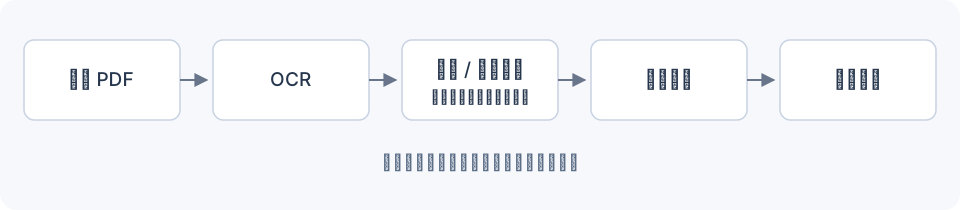
The diagram follows collection → OCR → text and visual governance → generation → independent review → evidence release and training data.
Start with Quick start, then Daily data flywheel. Run all commands from the repository root. Keep credentials in your local .env; collection targets belong in config/collection.json, and recipes and budgets in config/flywheel.json.
Optional small-model refiner: choose audit/apply mode, model and rewrite policy in .env; original evidence is preserved.
Choose an entry point
| Goal | Entry point | Guide |
|---|---|---|
| Daily collection, visual processing, and CPT export | workflow.flywheel_cli | Daily data flywheel |
| Feishu / Telegram / Discord / Slack or assistant tools | integrations.cli | App integrations and MCP |
| Process a local PDF or existing financial OCR | workflow.cli | Detailed reference guides |
| Discover sources or download PDFs separately | Collection and download CLIs | Detailed reference guides |
| Generate text and visual SFT from v7 | training.sft_cli | Text SFT · Visual SFT |
| Generation strategies and learned mixtures | training.mixture_cli / training.mixture_experiments | Methods · Mixtures · DoReMi / RegMix |
| Export text from existing v5/v6 releases | training.cli | Existing release export |
Recommended reading
- Install and configure models.
- Review source admission and generation methods.
- Run, review, retry, and trace.
- Understand releases and snapshots.
- Enable scheduling after a small real run.
Documentation coverage
The English edition covers the main workflow, training outputs, environment checks, documentation authoring, and deployment. Detailed standalone OCR, acquisition, governance, CLI, and operations guides remain available in Chinese through Reference and design. The language switch opens the corresponding page when available; otherwise it opens the English home page.
The project produces training files. A downstream training program runs model training. Legacy v5/v6 exports and v7 flywheel exports use different admission and segmentation policies; use the matching entry point.